
What is Dual-Write?
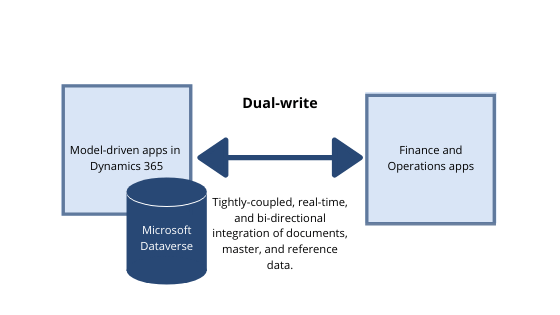
Dual-write is an out-of-the-box Microsoft integration feature. It enables real-time data synchronization between Dynamics 365 CRM and Dynamics 365 Finance and Operations. The synchronization is bi-directional.
- Microsoft Dynamics 365 Customer Engagement (CRM apps like Sales, Customer Service, Marketing)
- Dynamics 365 Finance and Operations (ERP apps like Finance, Supply Chain Management)
It ensures that data is written to both systems at the same time, keeping them synchronized without requiring custom integrations.
Dual-Write functions as a bridge between the two application environments. It ensures that shared data, like customer records, products, or sales orders are consistent. This data remains up-to-date across both systems. When one application changes, the other promptly updates in near real time.
In the past, organizations running both Dynamics 365 Finance & Operations and Dynamics 365 Customer Engagement faced challenges. They depended on complex, custom-built asynchronous integrations. Some also used third-party solutions to synchronize data. Such approaches often led to:
- Data Latency: Delays in data updates between systems, preventing real-time visibility.
- Data Inconsistencies: Mismatches and errors caused by failed or delayed synchronization processes.
- High Maintenance: Significant time and effort needed to manage, monitor, and troubleshoot integrations.
Dual-write addresses these challenges with a tightly coupled integration. It is real-time and synchronous. This integration allows business processes to flow seamlessly between the front office (CRM) and the back office (ERP).
Dual-Write’s Sync and Async
Dual-write primarily operates as a synchronous framework. It supports real-time transactions. Nonetheless, it also leverages asynchronous processing for handling large-scale data transfers. Understanding the distinction between these two modes is essential for maintaining data integrity and ensuring reliable system performance.
Synchronous (Real-Time)
This is the default mode used for ongoing transactional business processes. These processes include creating a new customer. They also involve updating a sales order.
How It Works: A user initiates a change (a “write”) in one application, such as Dynamics 365 Sales. Dual-write then attempts to execute the same transaction instantly. It also tries to perform it at the same time in the connected application, such as Dynamics 365 Finance.
Data Integrity: If the transaction fails in either system, the entire transaction is rolled back in the originating system. This can happen, for example, if a required field is missing in Finance & Operations. This ensures a high level of data consistency but requires reliable and fast network communication.
Example: For instance, a Sales Order can’t be completed in CRM. Dual-write must confirm that the corresponding record has been successfully created in Finance & Operations.
Asynchronous (Batch/Non-Real-Time)
Asynchronous processing is typically used for large data loads where immediate consistency is not essential. It is also used when the deal volume is too high to be handled efficiently by synchronous processing.
How It Works: The sending application completes the transaction locally. The data is then queued. It is processed by the receiving application at a later time. The originating user does not have to wait for the update to be completed in the other system.
Data Integrity: This mode is mainly used for the initial synchronization of large volumes of historical data. Examples include loading thousands of existing customer records. It is also used in scenarios where immediate failure notification is not critical.
Example: For example, the initial synchronization of all existing products from Finance & Operations to Customer Engagement is asynchronous. This method prevents long delays or system timeouts.
Key Features of Dual-Write
- Real-Time Data Synchronization: When data is created in one system, it is instantly reflected in the other system. The same happens when data is updated or deleted. It is then reflected in the other system.
- Bi-Directional Data Integration: Data flows in both directions between systems. This means updates made in CRM can show in ERP and vice versa, ensuring consistency across platforms.
- Integration Through Dataverse: Dual-write leverages Microsoft Dataverse as the common data platform. This allows both systems to share data efficiently. They also synchronize data seamlessly.
- Table Maps: Dual-write provides out-of-the-box table mappings between entities in both systems. These mappings reduce the need for custom integration development.
- Initial Data Synchronization: Before enabling live synchronization, Dual-write supports an initial data alignment process. This process aligns existing data between both systems.
- Transactional Consistency: Dual-write maintains transactional consistency, ensuring that data changes are committed successfully across both systems.
- Error Handling and Monitoring: Administrators can monitor synchronization status, detect errors, and resolve integration issues using built-in monitoring tools.
- Extensibility and Customization: Organizations can extend standard mappings or create custom mappings to support specific business requirements.
Dual-write ensures that CRM and ERP systems stay synchronized in real time. This enables organizations to run integrated business processes across sales, finance, and operations. They can do this without complex custom integrations.
Hope you learn something, Thanks for Reading 📖!
Happy Power365ing!

