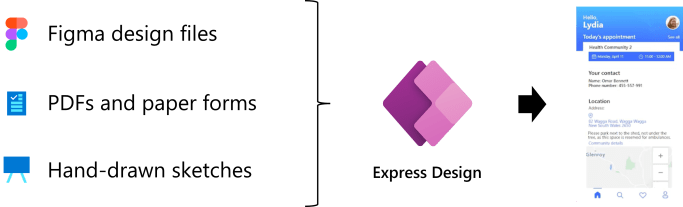
Introduction Microsoft announced the preview of Express Design in Power Apps, The ability to instantly generate low-code apps directly from design files and images. In just a few clicks, customers can now create web and Mobile Apps from a broad range of inputs—including Paper Forms and PDFs, sketches on the whiteboard, and even professionally-designed assets in Figma. The Express Design adds to the many ways in which Power Platform is applying advanced AI to assist more people in driving innovation for their teams and businesses. … Continue reading Microsoft Power Apps – Create Apps with Express Design
Category: Dataverse
Dataverse lets you securely store and manage data that’s used by business applications. Data within Dataverse is stored within a set of tables. A table is a set of rows (formerly referred to as records) and columns (formerly referred to as fields/attributes)
Microsoft Power Pages- Low Code Website
Microsoft Power Pages Microsoft Power Pages is a mix of new standalone technology, Microsoft announced in Build 2022. Power Pages is Part of the Microsoft Power Platform. The development of pages will be done in the existing Power Portal and Portal Management. The new designer, templates and new provisioning process are currently in public preview. … Continue reading Microsoft Power Pages- Low Code Website
Power BI visualization of Dataverse date View In Model-Driven Apps
Introduction Power BI works with model-driven apps in Microsoft Dataverse to provide a self-service analytics solution. Create reports in the Power BI service using the data that's in a view of your model-driven app. Power BI automatically generates the visuals using Power BI quick report visualization on a table feature. Enable Power BI visualization in … Continue reading Power BI visualization of Dataverse date View In Model-Driven Apps
Goodbye Relevance search, hello Dataverse search!
Relevance search is now Dataverse search to emphasize that all data within Dataverse is searchable. The same goodness of Relevance search will continue and we are committed to make Dataverse search even better! The new Dataverse search name is visible in the Power Platform Admin Center and the Power Apps maker portal within the updated solution … Continue reading Goodbye Relevance search, hello Dataverse search!
DYNAMICS 365 – POST-OPERATION PLUGIN
As per the Event Execution Pipeline for plugins in Dynamics 365, here we will look at a post-operation plugin. These plugins execute after the main system operation and within the database transaction. They can be synchronous and asynchronous. We have seen how to use pre-validation and pre-operation to update attribute values. In post-operation, the record is committed to the database, and the … Continue reading DYNAMICS 365 – POST-OPERATION PLUGIN
DYNAMICS 365 – PRE-OPERATION PLUGIN
As per the Event Execution Pipeline for plugins in Dynamics 365, here we will look at a pre-operation plugin. These plugins execute before the main system operation and within the database transaction. They run after the pre-validation has occurred. This is used for modifying/updating any attributes (note you can also technically do this in pre-validation). If you are creating a … Continue reading DYNAMICS 365 – PRE-OPERATION PLUGIN
DYNAMICS 365 – PRE-VALIDATION PLUGIN
As per the Event Execution Pipeline for plugins in Dynamics 365, here we will look at a pre-validation plugin. These plugins execute before the main system operation and outside the database transaction. Pre-validation runs before validation occurs. You can also modify values at this stage, though this may be generally done in pre-operation. If you are creating a record, … Continue reading DYNAMICS 365 – PRE-VALIDATION PLUGIN
DYNAMICS 365 PLUGIN EXECUTION PIPELINE
In Dynamics 365, when a plugin is run, it executes based on a pipeline execution model. Plugins can be triggered by: A user action in the Dynamics 365 user interface, such as retrieving a recordEvents triggered by the Organization Service or the WebAPI, such as retrieving a record Post-Operation events in the pipeline are processed … Continue reading DYNAMICS 365 PLUGIN EXECUTION PIPELINE
DYNAMICS 365 – IMPERSONATE A USER IN PLUGIN
In Dynamics 365, when testing plugins, you can change which user the plugin runs under. Due to this, open the step in the Plugin Registration Tool. We have a plugin that runs on the creation of an account, that creates a new Task. We will select this to run under the context of a user, … Continue reading DYNAMICS 365 – IMPERSONATE A USER IN PLUGIN
USING PLUGIN TRACE LOG TO TRACE PLUGIN EXCEPTIONS IN DYNAMICS 365
In Dynamics 365, you can add tracing to your code to assist with troubleshooting. To do this, in your plugin, add the code: ITracingService tracingService = (ITracingService)serviceProvider.GetService(typeof(ITracingService)); Then add a line to do the trace: tracingService.Trace("This is a trace."); Next, go to System Settings to actually turn tracing on in the system: Under Customization, you … Continue reading USING PLUGIN TRACE LOG TO TRACE PLUGIN EXCEPTIONS IN DYNAMICS 365