Power Apps Wrap Signature hash Code for Android

Introduction The wrap feature in Power Apps lets you create native mobile versions of your canvas apps as custom-branded Android and iOS mobile apps. You can distribute such wrapped native mobile apps to the end users through Microsoft Intune, Microsoft app center, Google Play or Apple Business Manager, or other native distribution methods. In the previous blog, we earn how to create the Azure AD … Continue reading Power Apps Wrap Signature hash Code for Android

Power Apps Wrap AD App Registration for Android

Introduction The wrap feature in Power Apps lets you create native mobile versions of your canvas apps as custom-branded Android and iOS mobile apps. You can distribute such wrapped native mobile apps to the end users through Microsoft Intune, Microsoft app center, Google Play or Apple Business Manager, or other native distribution methods. Makers can use wrap wizard to create secure, custom-branded, standalone Android and iOS enterprise native mobile … Continue reading Power Apps Wrap AD App Registration for Android

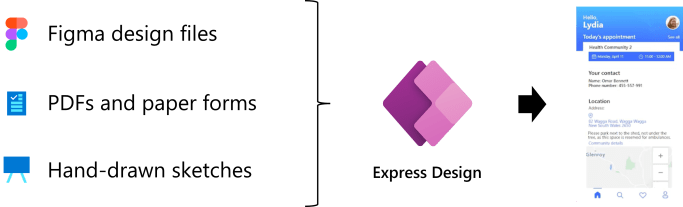
Microsoft Power Apps – Create Apps with Express Design

Introduction ย Microsoft announced the preview ofย Express Designย in Power Apps, The ability to instantly generate low-code appsย directlyย from design files and images.ย In just a few clicks, customers can nowย createย web and Mobileย Apps from a broad range of inputsโ€”includingย Paper Formsย andย PDFs,ย sketchesย on the whiteboard,ย andย evenย professionally-designedย assets in Figma.ย The Express Designย adds to the many waysย in whichย Power Platform is applyingย advancedย AI toย assistย moreย peopleย inย driving innovationย for their teams andย businesses. … Continue reading Microsoft Power Apps – Create Apps with Express Design

Power Apps Portal #16- DataTable Plugin to Custom Entity List [Part 2]

Introduction In this blog will see how to add DataTable Plugin to the Custom Entity List in the Power Apps Portals. DataTable Plugin will provide the CSS styling and pagination to the custom Entity List and the relevant search will be enabled to the table. In my previous blog explained adding CSS and JavaScript references … Continue reading Power Apps Portal #16- DataTable Plugin to Custom Entity List [Part 2]

Power Apps Portal #15- DataTable Plugin to Custom Entity List [Part 1]

Introductions In this blog will see how to add DataTable Plugin to the Custom Entity List in the Power Apps Portals. DataTable Plugin will provide the CSS styling and pagination to the custom Entity List and the relevant search will be enabled to the table. In my previous blog explained about adding a Custom Entity … Continue reading Power Apps Portal #15- DataTable Plugin to Custom Entity List [Part 1]

Power Apps Portal #14- Display Entity List using FetchXML and Liquid Code

Introduction Display the Dataverse table records in custom own Entity List using the FetchXML and Liquid code. Power Apps portal to display the records with Entity List can't be done, Using FetchXML and Liquid code we display the records with required filters. Implementation Go to Power Apps Maker Portal and get the FetchXML with the … Continue reading Power Apps Portal #14- Display Entity List using FetchXML and Liquid Code

Power Apps Portal #13- Entity List [Part-1]

Introduction Portals Entity Lists are a great method to display a list of records from Dataverse to the users. Easily and quickly create a Dataverse View, Entity List, and Web Page to present the necessary data for simple needs. You also have options to get quite complex if needed. In this blog will explain adding Entity … Continue reading Power Apps Portal #13- Entity List [Part-1]

Power Apps Portal #12- Web Roles for Portals

Introduction Web Roles are security roles in PowerApps portals, which you can control the access of a portal user. After the user has been configured as the portal and contact will be created as a Portal User. Portal User must be assigned one or more Web roles to perform any special actions or access any … Continue reading Power Apps Portal #12- Web Roles for Portals

Power Apps Portal #11- Enabling Terms and Conditions for Authenticate User

Introduction The General Data Protection Regulation (GDPR) is a legal act of the European Union (EU), which protects data for all individuals within the EU. With GDPR, people can control the use of their personal data in Microsoft Datavers. Microsoft Power Apps Portal can also establish terms and conditions that users must agree to in … Continue reading Power Apps Portal #11- Enabling Terms and Conditions for Authenticate User

Power Apps Portal #10- Disable Redirect Profile Page after successful sign-in

Introduction Power Apps Portal redirects the user to the profile page after successful sign-in. In this blog step by step demonstration of disabling redirect from Profile Page to Home Page on the successful sign-in. Disable Redirect to Profile Page Got Power Apps Maker Portal.Select the Environment where the portal is provisioned and Click on the … Continue reading Power Apps Portal #10- Disable Redirect Profile Page after successful sign-in