Introduction Natural language understanding is the ability for Power Virtual Agents to understand what the user is telling it. The bot is able to route the user to the topic related to, even if that exact phrase isn't listed as a trigger phrase. An entity represents a real-world subject, such as a phone number, zip … Continue reading Power Virtual Agents #9: Entities for Conversation in chatbot
Author: Srinath Pega
Power Virtual Agents #8: Redirect the Conversation To Different Topic
Introduction In the previous blog , Building Conversation using the variables https://srinathpega.com/2022/06/27/power-virtual-agents-7-build-conversation-using-variables/ In this blog Will se how to redirect the conversation to the other Topics. This helps in reduces the number of places you keep the same information in the Bot, So we can update it one place if necessary and not worry about … Continue reading Power Virtual Agents #8: Redirect the Conversation To Different Topic
Power Virtual Agents #7: Build Conversation using variables
Introduction In the previous blog Creation of the topic for the bot conversation https://srinathpega.com/2022/06/26/power-virtual-agents-6-topic-creation-for-conversation/ In this blog will see building the conversation for the bot using variables. Variables to handles the dynamics content, such data input by the user. Variables save responses from user to helps guide the conversation. Variable’s value can only be used … Continue reading Power Virtual Agents #7: Build Conversation using variables
Power Virtual Agents #6: Topic Creation for Conversation
Introduction Power Virtual Agents, a topic that determines how a bot responds to a question from a user. You can create topics by customizing provided templates, creating new topics from scratch or get suggestions from existing help sites. Topics have Trigger Phrases and Conversation NodesTrigger Phrases: phrases, keywords, or questions that a user is likely … Continue reading Power Virtual Agents #6: Topic Creation for Conversation
Power Virtual Agents #5: Publish your bot to the demo site
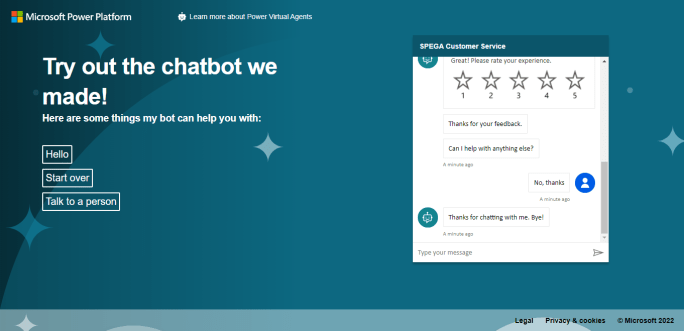
Introduction Power Virtual Agents provides a demo website so that you can invite anyone to test your bot by sending them the URL. The demo website is useful to gather feedback to improve the bot content before you activate the bot for your real customers. After you've published at least once, you can connect your … Continue reading Power Virtual Agents #5: Publish your bot to the demo site
Power Virtual Agents #4: Edit the existing Topic
Introduction In this blog, I will show step by step process of the creation of a new Topic for chatbot from existing Topics. Copy the Topic Go to https://powerva.microsoft.com/ and select the bot and Environment. 2. Click on the Topic in the left Pane. 3. Hover the mouse on topics, appears the More actions, click on … Continue reading Power Virtual Agents #4: Edit the existing Topic
Power Virtual Agents #3: Build First Chatbot
Introduction Power Virtual Agents helps you quickly and easily create AI-powered solutions to some of your customer support challenges – no developers or data scientists are required.This blog will go through the step-by-step process of creating, deploying, and testing the first bot to handle a common customer request.PVA Chatbot Creation Go to https://powerva.microsoft.com/ and Click … Continue reading Power Virtual Agents #3: Build First Chatbot
Microsoft Power Pages- Content Delivery Network Cache
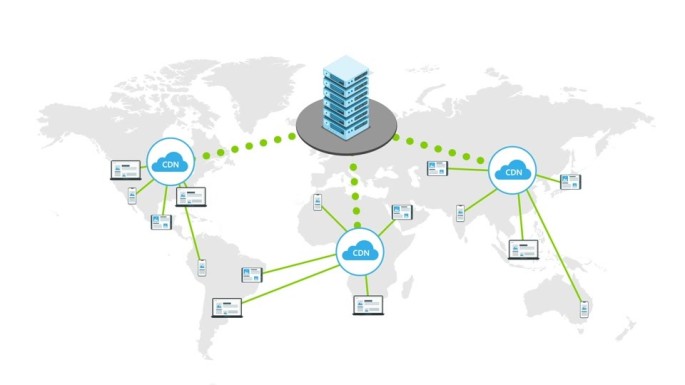
Introduction Content Delivery Network (CDN) is a distributed network of servers that can efficiently deliver web content to users. CDN’s store cached content on edge servers in point-of-presence (POP) locations that are close to end-users, to minimize latency. CDN will be stored and served from the CDN server closest to your location, static content like … Continue reading Microsoft Power Pages- Content Delivery Network Cache
Microsoft Power Pages – Content Delivery Network(CDN)
Introduction Content Delivery Network (CDN) is a distributed network of servers that can efficiently deliver web content to users. CDN's store cached content on edge servers in point-of-presence (POP) locations that are close to end-users, to minimize latency. CDN will be stored and served from the CDN server closest to your location, static content like … Continue reading Microsoft Power Pages – Content Delivery Network(CDN)
Microsoft Power Apps – Create Apps with Express Design
Introduction Microsoft announced the preview of Express Design in Power Apps, The ability to instantly generate low-code apps directly from design files and images. In just a few clicks, customers can now create web and Mobile Apps from a broad range of inputs—including Paper Forms and PDFs, sketches on the whiteboard, and even professionally-designed assets in Figma. The Express Design adds to the many ways in which Power Platform is applying advanced AI to assist more people in driving innovation for their teams and businesses. … Continue reading Microsoft Power Apps – Create Apps with Express Design