Power Apps Portals #5 – Adding Sections Layouts to Webpage

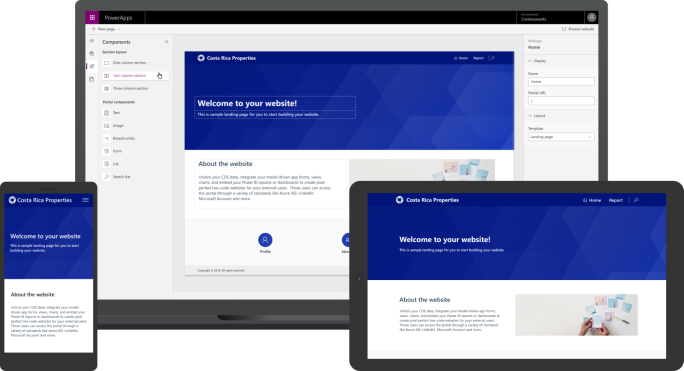
Web page Sections Layouts allows to define a structure for web page and arrange portal components. The page designer enables us to define section layouts that consist of one, two, or three columns. There may be a requirement to build a layout that consists of more than three equally spaced sections. you can add portal … Continue reading Power Apps Portals #5 – Adding Sections Layouts to Webpage

Power Apps Portals WebPage Components

Power Apps Portal maker can add a set of predefined components on the page to format the layout and add static and dynamic content. The WYSIWYG (What You See Is What You Get) editor allows you to add and edit the required components on the canvas easily, from Toolbelt components. The selected component is added … Continue reading Power Apps Portals WebPage Components

Introduction Power Apps Portals WebPages

A webpage is identified by a unique URL in a website. It is one of the core objects of the website and builds a hierarchy of the website through parent and child relationships to other webpages. The portals Studio command bar, select New page. You will be presented with a number of page layout choices. The … Continue reading Introduction Power Apps Portals WebPages

Introduction To Power Apps Portals WYSIWYG Design Studio

Microsoft Power Apps portals Studio is a WYSIWYG (What You See Is What You Get) design tool that will allow portal makers to create and customize the Portal. It contains various options to add and configure web pages, components, forms, content and specify properties of portal components. Portals Studio is accessible from the Power Apps … Continue reading Introduction To Power Apps Portals WYSIWYG Design Studio

Getting Started with Power Apps Portals

What is Power Apps Portals? Power Apps Portals are external-facing websites, that allow users from both organization and outside organization to sign in to create and view data in Microsoft Dataverse. Power Apps Portals are launched on October1, 2019, All Dynamics 365 Portals are now referred to as Power Apps Portals. Power Apps Portals Creation … Continue reading Getting Started with Power Apps Portals

Power Apps Add into Excel for Creating and Updating records in Dynamics 365 CRM by Srinath Pega

The Microsoft PowerApps Office Add-in enables data connections to Microsoft PowerApps systems In Excel, the Microsoft PowerApps Office Add-in allows users to read, analyze, and edit data from Microsoft PowerApps (Common Data Model) and publish data changes back to Microsoft PowerApps OData services. Any errors encountered on publish are indicated to the user via row-by-row … Continue reading Power Apps Add into Excel for Creating and Updating records in Dynamics 365 CRM by Srinath Pega

Error Fix in Creating Dynamics 365 Trial

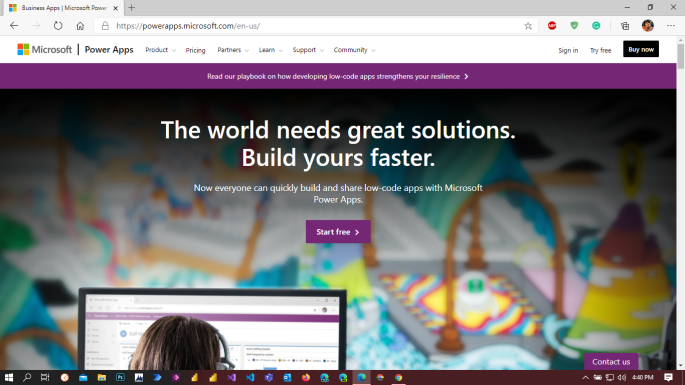
Creating Dynamics 365 trial https://trials.dynamics.com/ , Its asking business identity means need a business domain. Learn More on Domain : https://docs.microsoft.com/en-gb/microsoft-365/admin/get-help-with-domains/what-is-a-domain Creating Dynamics 365 Trail from Power Apps: Go to https://powerapps.microsoft.com/en-us/ 2. Click on pricing on navigation . It will open below screen. 3. Click on Try free. Opens the Power Apps Trial Instance creation … Continue reading Error Fix in Creating Dynamics 365 Trial

Monitor now supports model-driven Apps

“Why is my form performing so slowly?”  “Where is this script error coming from?”  “Why is my field control not showing up?” The Monitor tool (currently supported on canvas apps) provides a way to view a stream of events from a user’s session in order to diagnose an issue.  It support the following events on … Continue reading Monitor now supports model-driven Apps

Add and Create Data to an Entity use dataflows in Power Apps

Data preparation available in Power Apps, you can create a collection of data called a dataflow, which you can then use to connect with business data from various sources, clean the data, transform it, and then load it to Common Data Service or your organization’s Azure Data Lake Gen2 storage account. A dataflow is a … Continue reading Add and Create Data to an Entity use dataflows in Power Apps

Visualize and interpret location data with the Interactive map component.

[This topic is pre-release and is subject to change.] Easily bring dynamic mapping capabilities into your canvas apps by viewing the physical position of entities from a data source, or by inputting new physical locations. Pan, tilt, zoom, and drag to center your map view. As you zoom out, the markers will optionally cluster to … Continue reading Visualize and interpret location data with the Interactive map component.